1. Log in to your cPanel account.
2. In the Databases section, click on MySQL Databases.
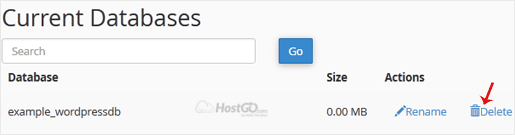
3. Under Current Databases, you can see a list of all your databases. Locate the database you want to remove and click on Delete.4. Click on Delete Database.
Overview MySQL databases allow you to store lots of information in an easy to access manner. The...
Overview You can easily delete a MySQL database from your web hosting account. Follow the...
Overview There are two primary steps when creating a MySQL user. The first step is to create a...
Overview phpMyAdmin is a web based database administration tool specifically for managing MySQL...
Overview Remote MySQL allows external web servers to access your MySQL databases by adding their...
版權所有 © 2026 HostGo。版權所有。